
Architecture of Docker
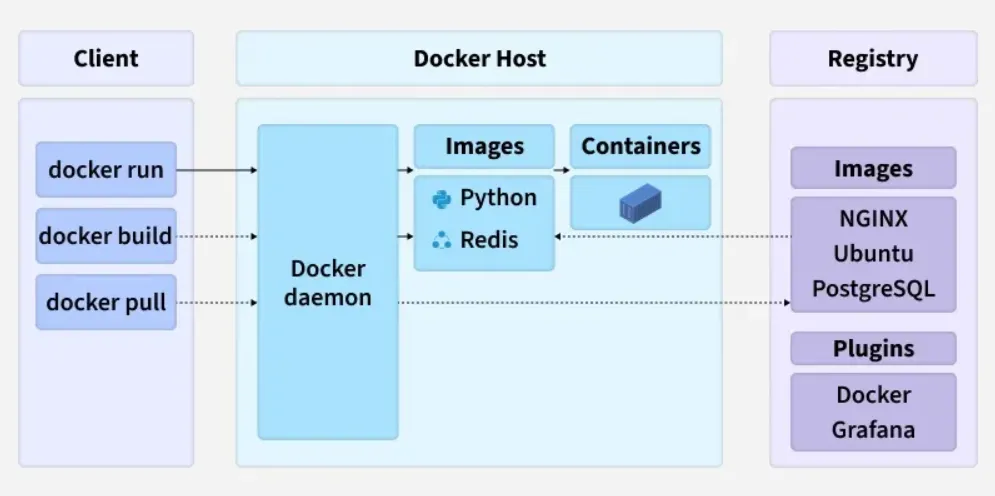
Docker uses a client–server architecture. The Docker client talks to the Docker Daemon, which builds, runs, and manages containers. They communicate through a REST API via UNIX sockets or a network interface.
- Docker is based on a client–server model.
- The Docker client sends requests to the Docker Daemon.
- The Docker Daemon handles container lifecycle tasks.
- Communication happens over a REST API using sockets or networks.
What is Docker?
Docker is an open-source platform that enables developers to build, package, ship, and run applications inside containers. It solves one of the most common problems in software development: ensuring that an application works consistently across different environments.
The fundamental concept behind Docker is simple yet powerful: it packages an application along with all its dependencies including code, libraries, system tools, runtime, and configuration settings, into a single, self-contained unit. This eliminates the frustration of hearing “it works on my computer but not on yours.” With Docker, you can confidently say: “it works everywhere the same way.”
Understanding Containerization
Containerization is the underlying technology that packages an application and all its dependencies into a container a lightweight, portable, and isolated unit that can run consistently across any environment. A container provides:
- Lightweight architecture - Containers use minimal resources compared to virtual machines
- Portability - The same container runs on any system with Docker installed
- Fast startup - Containers start in seconds, not minutes
- Isolation - Each container operates independently without interfering with others
A Practical Analogy
Think of containerization like a cooking scenario:
Without Containerization: You share a recipe with a friend, but they fail to recreate it because they lack the right stove, utensils, ingredients, or temperature settings. Each person must set up their entire kitchen separately.
With Containerization: You package the entire kitchen setup stove, utensils, ingredients, and temperature controls, into a portable box. Anyone who receives this box can cook the exact same recipe perfectly, every time. This portable box is your container, and Docker is the system that creates and manages these boxes.
Core Docker Components
Docker Image
A Docker image is a blueprint or template that defines how a container should be built and run. It contains:
- Application source code
- Runtime environment
- System libraries and dependencies
- Environment variables and configuration
Think of an image as a class definition in object-oriented programming. It describes the structure and contents, but it’s not executing anything yet.
Docker Container
A Docker container is a running instance of a Docker image. If you’re familiar with OOP concepts, the relationship is straightforward:
- Image = Class
- Container = Object (instance of that class)
Multiple containers can run from the same image, each executing independently with its own isolated resources.
Docker Engine
The Docker Engine is the core software component that powers Docker. It is responsible for:
- Building images from Dockerfile specifications
- Running and managing containers
- Handling networking between containers
- Managing storage and volumes
- Coordinating all container lifecycle operations
Dockerfile
A Dockerfile is a text file containing a series of instructions that tell Docker how to build an image. It specifies:
- The base operating system or runtime
- Dependencies to install
- Files to copy
- Commands to execute
- Environment configuration
- Default startup commands
Example Dockerfile:
FROM node:18
WORKDIR /app
COPY . .
RUN npm install
CMD ["node", "server.js"]
This file instructs Docker to start with Node.js 18, set the working directory, copy application files, install dependencies, and run the server.
Docker Architecture: The Client-Server Model
Docker operates on a client-server architecture with three main components:
Docker Client
The Docker client is your command-line interface where you execute Docker commands:
docker build
docker run
docker ps
docker stop
The client communicates with the Docker Engine, sending your requests for processing.
Docker Engine (Server)
The Docker Engine consists of:
- Docker Daemon (dockerd) - A background service that performs all the actual work
- REST API - Enables programmatic communication with Docker
- CLI - The command-line tool users interact with
Docker Objects
Docker manages several types of objects:
- Images - Blueprints for containers
- Containers - Running instances of images
- Volumes - Persistent storage for data
- Networks - Enable communication between containers
Essential Docker Commands
Understanding these commands is crucial for working with Docker effectively:
Checking Docker Version
docker --versionBuilding an Image
docker build -t myapp .The -t flag names your image, and . indicates the Dockerfile is in the current directory.
Listing Local Images
docker imagesShows all images stored on your system with their sizes and creation dates.
Running a Container
docker run myappTo run a container in the background:
docker run -d myappViewing Running Containers
docker psTo see all containers (including stopped ones):
docker ps -aStopping a Container
docker stop <container_id>Removing a Container
docker rm <container_id>Removing an Image
docker rmi myappAccessing a Running Container
docker exec -it <container_id> bashThis command opens an interactive terminal inside the container, which is invaluable for debugging.
Docker vs Virtual Machines
Understanding the differences between Docker containers and virtual machines is fundamental to appreciating Docker’s advantages:
| Aspect | Docker Containers | Virtual Machines |
|---|---|---|
| Size | Lightweight (MBs) | Heavy (GBs) |
| Startup Time | Seconds | Minutes |
| Operating System | Share host OS kernel | Each VM has full OS |
| Performance | Near-native | Slightly slower |
| Isolation | Process-level | Full system-level |
The key difference is that containers share the host machine’s operating system kernel, while virtual machines include a complete operating system. This makes containers significantly faster to start and more resource-efficient.
Docker Networking
Docker provides different networking options for containers to communicate:
Bridge Network
The bridge network is Docker’s default networking mode for containers on a single host. It works by:
- Creating a virtual network interface (like a virtual switch)
- Assigning each container a private IP address (typically in the
172.17.0.0/16range) - Enabling containers to communicate using their IP addresses or names
- Allowing the host to communicate with containers through port mapping
Use Case: Local microservices that need to communicate on the same machine, such as a web server and database running together.
Example:
docker run -d --name web --network bridge nginx
docker run -d --name db --network bridge mysql
In this setup, the web container can communicate with the database container using db:3306.
Host Network
In the host network mode, containers share the host machine’s network stack directly:
- No virtual network is created
- Containers use the host’s IP address directly
- No port mapping is required
- Better performance but less isolation
Use Case: High-performance applications requiring direct network access, such as monitoring tools or real-time data processing systems.
Example:
docker run -d --name web --network host nginxOverlay Network
The overlay network extends Docker networking across multiple machines:
- Requires Docker Swarm or Docker Enterprise
- Enables containers on different hosts to communicate seamlessly
- Uses VXLAN tunneling for traffic forwarding
Use Case: Distributed microservices architectures where services run on different machines but need to communicate as if on the same network.
Why Containerization Matters
Portability
Containers run consistently across:
- Developer laptops and local machines
- Testing and staging servers
- Production cloud environments
- Different operating systems (Linux, Windows, macOS)
Consistency
The same container behaves identically regardless of where it runs, eliminating environment-related bugs and unpredictable behavior.
Isolation
Each container operates independently with its own filesystem, processes, and resources, preventing applications from interfering with one another.
Rapid Deployment
Containers start in seconds, enabling quick deployments and faster response to changes.
Scalability
You can easily create multiple instances of a container to handle increased demand, distributing load across multiple instances.
Real-World Applications of Docker
Web Development and Microservices
Major technology companies like Netflix, Spotify, and Airbnb use Docker extensively to:
- Deploy microservices architectures
- Scale individual services independently
- Manage traffic across millions of users
- Ensure consistent environments across development and production
Practical Example: DrukRide Backend
A ride-sharing application like DrukRide can be structured as:
- User Service - Handle user authentication and profiles
- Driver Service - Manage driver information and status
- GPS Tracking Service - Process real-time location data
- Payment Service - Handle transactions
- Rating Service - Manage user and driver ratings
- Database - Store persistent data
Each service runs in its own container, allowing independent scaling. When GPS tracking demand spikes during peak hours, additional tracking service containers can be automatically deployed without affecting other services.
Machine Learning Deployments
Data scientists can package:
- Python runtime
- Machine learning frameworks (TensorFlow, PyTorch)
- Required dependencies and libraries
- Trained model files
This containerized solution can be deployed anywhere without dependency conflicts, ensuring reproducibility across different environments.
CI/CD Pipelines
Containerization integrates seamlessly with Continuous Integration and Continuous Deployment workflows:
- Code is pushed to repository
- Docker automatically builds an image
- Tests run inside the container
- If tests pass, the container is deployed to production
The same environment throughout this pipeline minimizes bugs and ensures reliability.
Cloud Deployment
Cloud platforms like Amazon Web Services (AWS), Microsoft Azure, and Google Cloud all use containers to:
- Automatically scale applications based on demand
- Deploy services globally
- Manage high-traffic situations
- Provide managed container services (ECS, AKS, GKE)
Practical Example: University Project Deployment
Without Docker:
- Teacher receives C++ backend project
- Must install exact compiler version
- Must install specific libraries
- Must configure system environment
- Project still may not work due to environment differences
With Docker:
- Student submits Docker image
- Teacher runs:
docker run student-image - Project runs perfectly on any machine
- No dependency conflicts or compatibility issues
The difference is enormous in terms of time, reliability, and reproducibility.
Summary
Docker and containerization have revolutionized how applications are developed, deployed, and managed. By packaging applications with their dependencies into isolated, portable containers, Docker ensures consistency across environments and enables efficient resource utilization. When combined with orchestration tools like Kubernetes, Docker enables organizations to manage thousands of containers automatically, providing scalability, reliability, and flexibility that traditional deployment methods cannot match.
The containerization ecosystem led by Docker, is now fundamental to modern software development, cloud computing, and DevOps practices. Whether you’re building a small project or managing enterprise scale infrastructure, understanding Docker and containerization is essential for any developer or DevOps professional.